Topic: Finding bad RAM on a Wavemate Bullet
Date: 2026 JUL 17
In the summer of 2022, I was helping Iain McFetridge debug a Wavemate Bullet system via email. He had two systems, one which worked perfectly, and another which booted, printed its sign-on message, but gave absolutely nonsensical DIR output. After a bunch of testing, we came to the conclusion that the likely problem was a bad 4164 RAM chip. The problem was, there are sixteen on the Bullet (128 KB total), and they are all soldered. Iain didn’t have a vacuum desoldering system and had lifted several traces making the repairs he had done so far, so he decided to trade the board to me for some S-100 work.
Four years later, I came across the board and decided to finally sit down and debug it. Here’s the board, basically as received:

Iain had been short on Z80s and stole the socketed one from the Bullet before sending it to me, as we have plenty, so one was installed from inventory.
Initial Testing
Before starting repairs, I wanted to hook the board up and check it out, to make sure nothing else had gone wrong since Iain last worked on the Bullet. I plugged a Z80 in, cabled it to a pair of 5.25” DSDD 40-track diskette drives, powered everything from an AT power supply, and wrote out disks from Don Maslin’s archive. The Bullet still booted, and still produced the bizarre output:
  60K CP/M V2.2, Z80SBC CBIOS V0.5E

  A>dir
  A: @SLBLHNJ BOL : @SLLHB   REL : DDT      BNL : DDLBR    BNL
  A: DULP     BOL : FINDB@D  BOL : FORL@T   BOL : HDLP     BNL
  A: HDLP00   BNL : LARL     BOL : LINJ@RL  HMP : LO@D     BOL
  A: LELTDRT  BOL : LLN@D    BNL : LNVBPL   BNL : LYB      BOL
  A: MYB      LIB : PAFDNTT  BOL : PIP      BOL : PRHNT    BNL
  A: PRHNTL   BNL : RETTP    BOL : RINV     BOL : RT@T     BNL
  A: RT@TTR   BNL : RUBLHT   BOL : RURVDX   BOL : TO@RB    BOL
  A: TOBRTNBH BOL : TNBRZ80  BNL : TNDR@    BNL : TOLN@D   BOL
  A: TOLN@D2  BOL : TSP      BOL : XSTB     BOL
  A>
The entry DDT.BNL gives the first clue: BNL is one-off from COM, and it makes sense that DDT wouldn’t be affected by a bad low bit. We know it can’t be all of RAM, or a stuck data bit on the bus or something, because the signon prints CP/M and CBIOS just fine.
Replacing RAM
So, how are we going to find a bad DRAM out of 16 in a board that can’t boot far enough to run a memory test, and doesn’t have socketed memory? We’re going to make it have socketed memory! This isn’t too bad of a task with a good vacuum desoldering station, and we have Hakko 472D stations at several benches around the shop. I socketed and replaced the bank of RAM closest to the CPU first, which yielded no change.
I then removed the second bank of RAM, the one furthest from the CPU. Unfortunately, I ran into poorly adhered traces on this bank, as Iain had in his previous repairs:
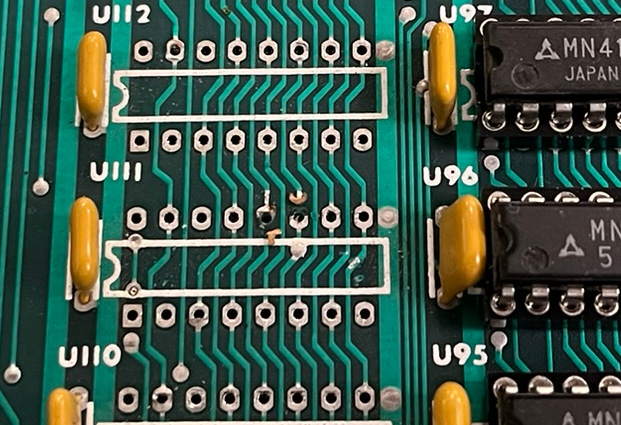
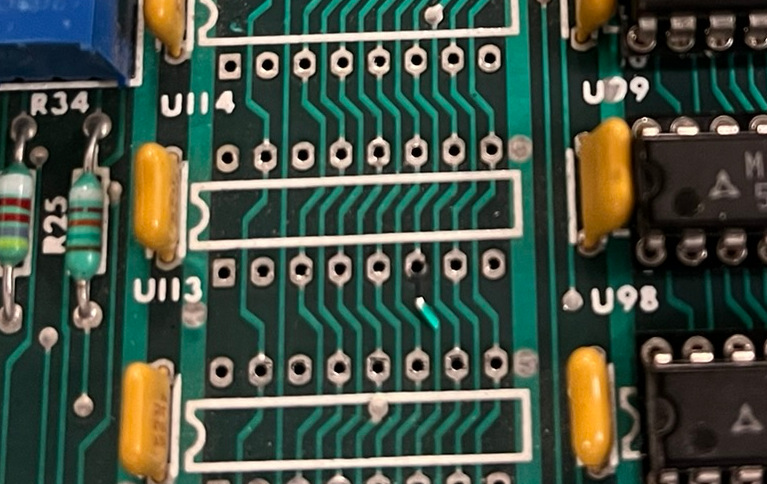
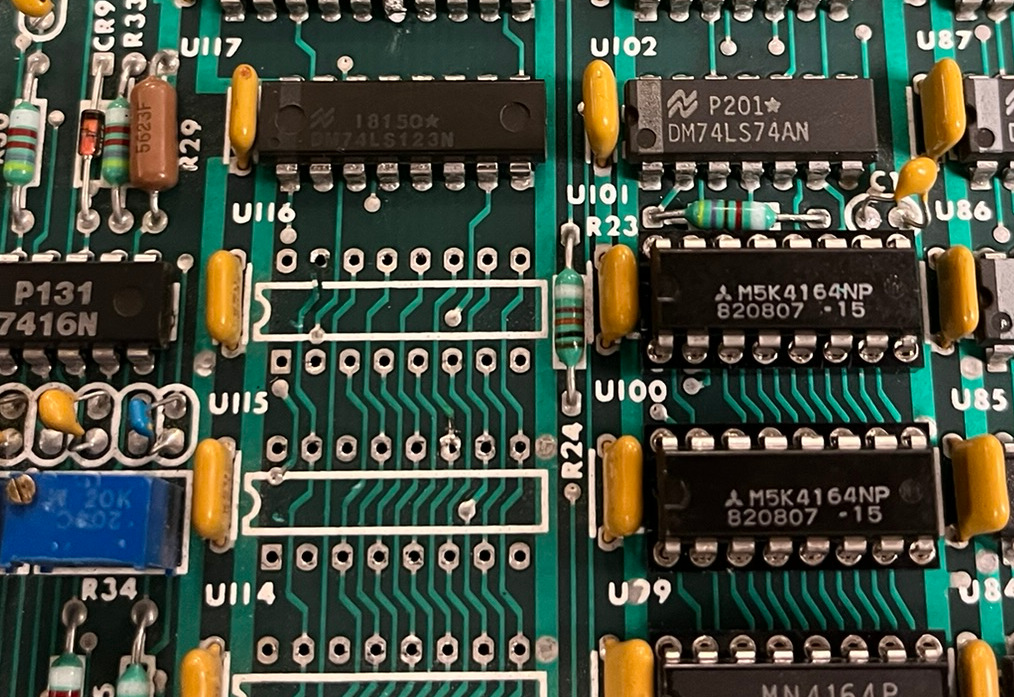
Not a show stopping problem, though. My usual repair for this type of trace damage is to cut the lifted traces back a little, scrape away the solder mask, solder a small piece of bare #30 AWG silver plated wire to the end of the trace, and then feed the wire through the hole. A socket is then inserted, and carefully soldered with minimal dwell time, to prevent letting the trace end of the wire come free. This worked fine, and everything passed continuity checks with the sockets in.
Out of curiosity, I ran a quick test with all of the RAM in this bank out:
  60K CP/M V2.2, Z80SBC CBIOS V0.5E

  A>dir
  A:   :   :   :
  A:   :   :   :
  A:   :   :   :
  A:   :   :   :
  A>
Ah hah! That’s an interesting change. It seems that CP/M is booting into one bank, but the directory scratch area is in another bank. That makes sense with CP/M and CBIOS in the signon message printing properly.
With known-good DRAMs installed, CP/M booted properly and DIR gave the expected results:
  60K CP/M V2.2, Z80SBC CBIOS V0.5E

  A>dir
  A: ASM      COM : ASMB     COM : ASMBLINK COM : ASMLIB   REL
  A: DDT      COM : DELBR    COM : DISK     COM : DUMP     COM
  A: DUMPX    COM : ED       COM : FINDBAD  COM : FORMAT   COM
  A: HELP     COM : HELP11   COM : LASM     COM : LINKASM  HLP
  A: LINKASM2 COM : LINKASM3 COM : LOAD     COM : MEMTEST  COM
  A: MLOAD    COM : MOVCPM   COM : MYC      COM : MYC      LIB
  A: OPRINT   COM : OPRINTM  COM : PAGEOUT  COM : PIP      COM
  A: PRINT    COM : PRINTM   COM : REDH19   COM : SAP      COM
  A: SDIR     COM : SETUP    COM : SHOW     COM : STAT     COM
  A: STATUS   COM : SUBMIT   COM : SURVEY   COM : SYSGEN   COM
  A: TED      COM : UNARC    COM : UNCRUNCH COM : UNCRZ80  COM
  A: UNERA    COM : UNLOAD   COM : UNLOAD2  COM : UNTAB    COM
  A: UNZIP    COM : USQ      COM : XSUB     COM
  A>
To confirm that there was indeed a bad DRAM chip, I cleaned up the pins on the desoldered RAM and plugged it into a recently repaired AST SixPakPlus. I then plugged the SixPakPlus into an IBM 5150 PC motherboard with 256 KB RAM on it. The BIOS POST caught the bad bit – problem confirmed!
Final Cleanup
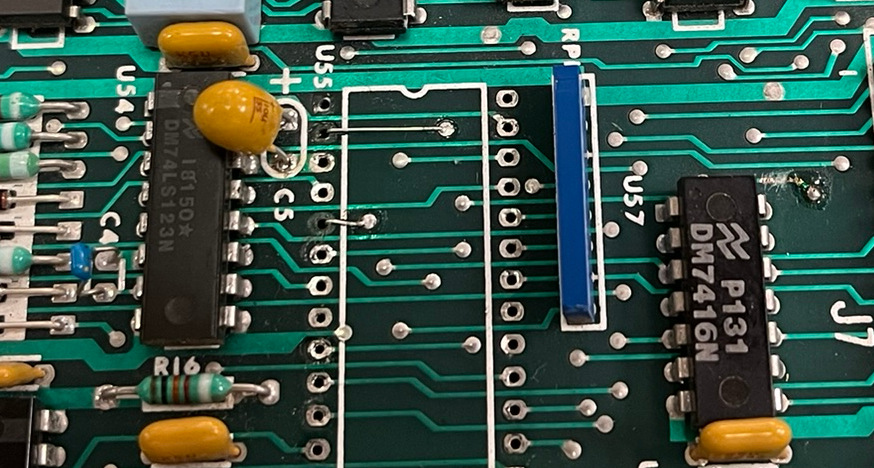
There were a few final things that needed fixing before the Wavemate Bullet was good to go. During testing, I had a few instances where the RS-232 lights box went dark, or the floppy drive stopped selecting. Tapping on the board “fixed” it, so I suspected there were bad sockets. I found a mix of bad sockets and trace issues from previous repairs. The FDC had a bad socket, as well as some lifted traces which Iain had repaired with flywires on the back. I fixed them with my usual repair method:
For the loss of RS-232 communications, I initially suspected more bad sockets, so I replaced the sockets for the Z80 DART and the 1488/1489 RS-232 level shifters. This seemed to fix the issue, but I had another RS-232 drop later on, when checking out the programs included on the diskette image I was using. I eventually found the problem around one of the ICL7660 switched capacitor voltage converters, a broken and lifted pad for capacitor C7:
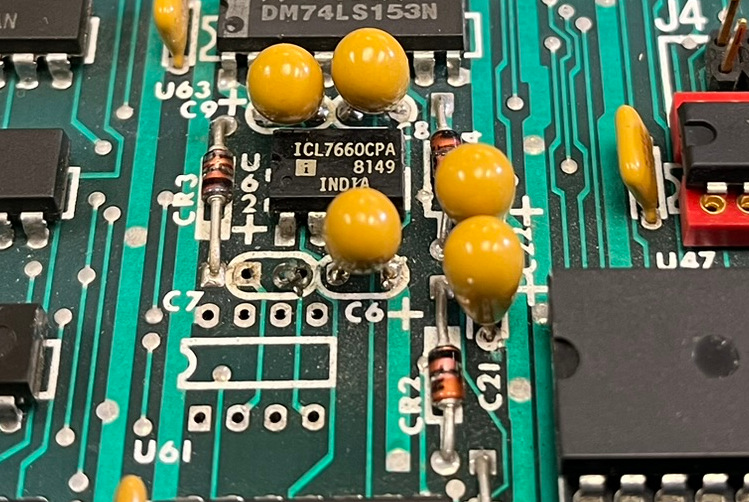
I did socket the ICL7660 in the course of doing this repair, though it was not entirely necessary. I figured if it ever failed, the board probably wouldn’t withstand rework without more damage, since it was already showing signs of fragility.
Here’s the Bullet with all of the repair work done:
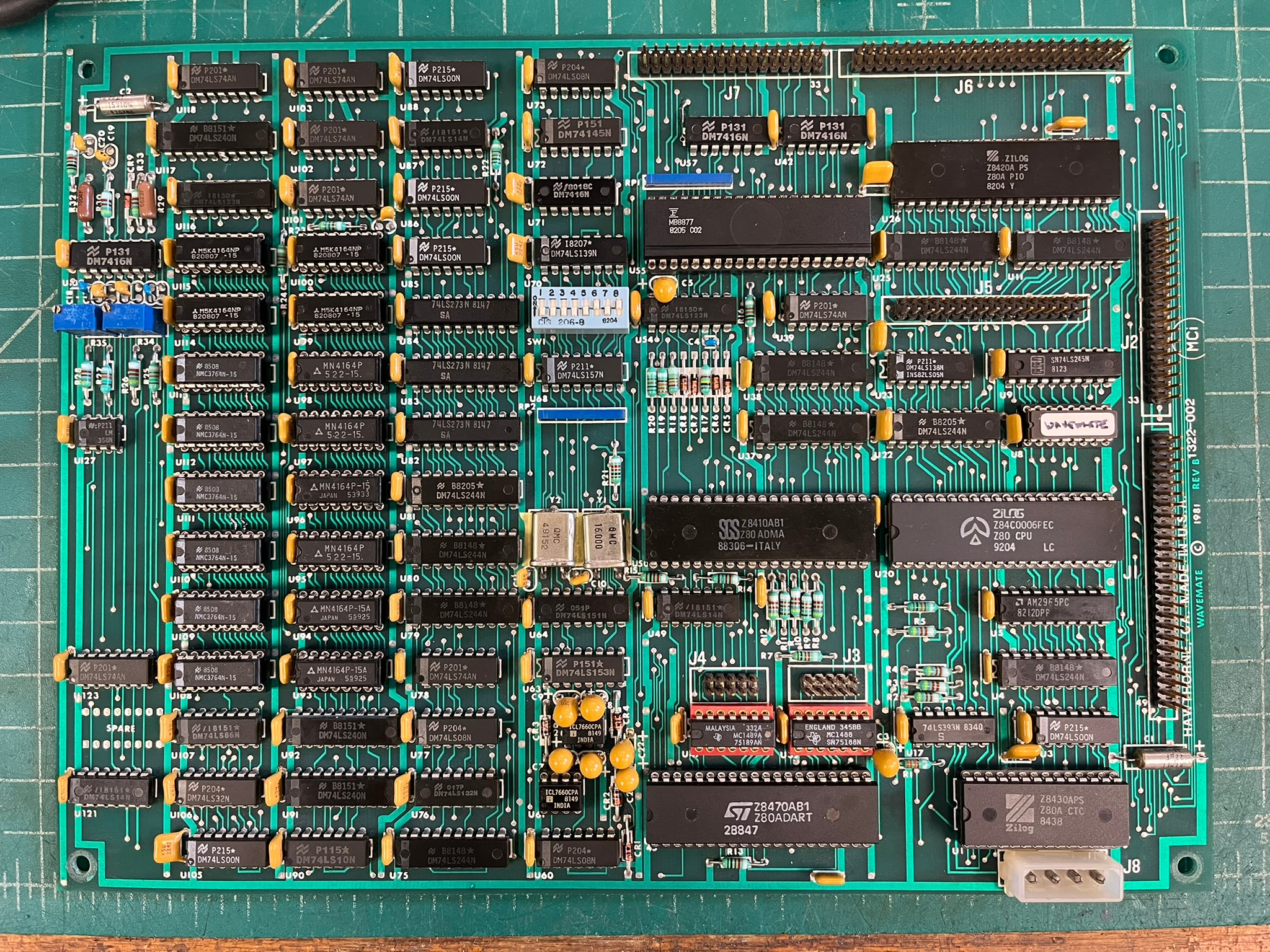
Not a bad repair job, but I probably shouldn’t have waited four years to do it! It looks like the Bullet will make a nice addition to CP/M testbed and utility systems, especially since it can run CP/M 3.0 and supports both 5.25” and 8” diskette systems.
Reset Modification
Iain had modified the Bullet to have an external reset switch, via two unused pins on the console serial port header. This is an easy and worthwhile modification, and only requires bridging one unused pin to ground, and jumping the other to the positive terminal of the reset capacitor:
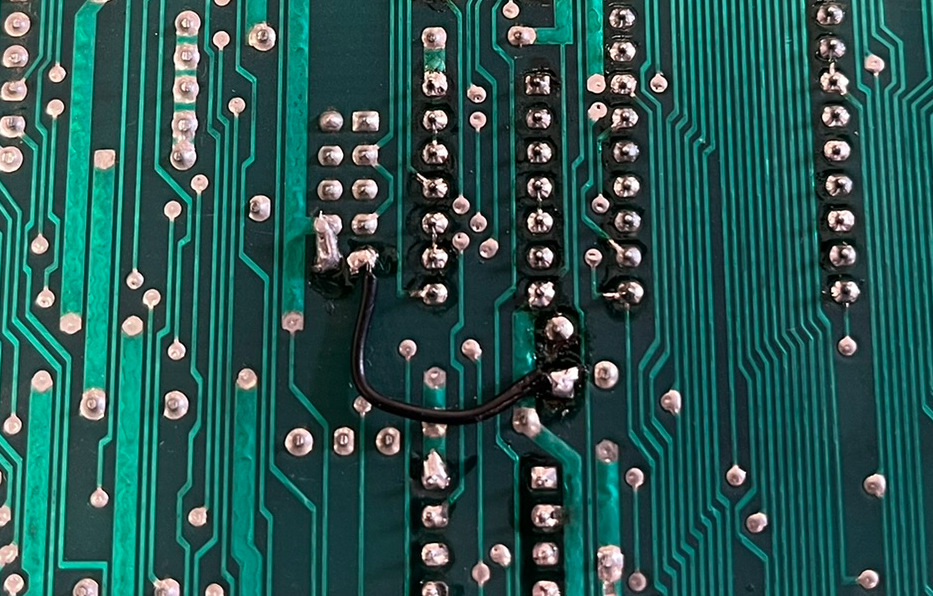
Iain had provided a custom console pigtail and reset switch with the board. I certainly used the reset switch quite a bit in testing!
Boot ROM
The Wavemate Bullet boots using a 32x8 (yes, 32 bytes) bipolar fuse PROM. I dumped the fuse PROM with the Data I/O 29B and UniPak 2B. The ROM image is available here, in Intel HEX format.
Future Hacking
I want to port PCGET/PCPUT to the Bullet’s serial configuration to make moving programs on and off easier, as there was no XMODEM or other transfer utility on the diskette image I was using. I also need to move MEMR.COM, the Rasmussen memory testing program, to the system, and complete an in-system test of the installed RAM. It passed test on the IBM 5150 PC in the AST SixPakPlus, but I’d like to be sure!
DRAMs replaced