Topic: Getting IDE working on a 5170
Date: 2026 JUL 23
Getting 16-bit IDE running on an IBM 5170 PC/AT with the original IBM BIOS is a big enough issue that people often run an XT-IDE alongside the MFM/floppy combo controller. I’m in the process of rebuilding my PC/AT, so I thought I’d take the time and nail down what does and doesn’t work. First off, the famous…
601 Floppy Error with non-IBM Controllers
If one removes the MFM/floppy combo controller and installs something else, you’ll end up with a 601 floppy error code, and a POST stop waiting for F1. This is something that only happens with an original IBM BIOS, and not with all version of the PC/AT BIOS. It’s caused by a test that IBM added at some point, which expects to be able to write to the WD1003 controller’s cylinder register, and read the value back. If this test fails, a 601 error is printed.
There’s some speculation as to why this test exists, though I’m not aware of an official IBM explanation. It’s suspected that the test is a way to determine if a newer controller which support 1.2 MB high density diskette drives is installed, vs. an old 360 KB double density only controller, such as those found in the IBM PC and PC/XT. The fault is presented as a floppy error code to indicate that the controller won’t handle high density. This seems to be the leading theory.
In contrast to what you’ll find online, the test is not an attempt to lock people into using only the IBM FRU for the MFM/floppy combo card! Basically any WD1003 combo card will work. I tested a handful of the cards in our inventory, and none of them caused a 601 error. In fact, my personal PC/AT came to me with a Western Digital non-IBM FRUed combo card installed, and was run like that its entire life, prior to my acquiring it in the late 90s.
Now, replacing the combo card with an ESDI, SCSI, non-WD1003 MFM, and many RLL controllers will generate the 601 error, simply because the cylinder register isn’t at the same address. Many of the above types of controllers include their own bootable BIOS, so the difference in controller registers doesn’t matter.
But! Folks report the same error with IDE/floppy combo controllers, and IDE is supposed to be a superset of WD1003, right? It certainly is, and the cylinder register is at the same address, but the cylinder register is only present if an IDE drive is plugged in. An IDE/floppy combo card with nothing plugged into the IDE channel will give the 601 error, but with a drive plugged in, there are no problems. There’s the caveat that not all things which plug into an IDE channel may behave properly; in particular, I got the 601 error with several CompactFlash cards on CF to IDE adapters.
So the short of it is: if you’re running an IDE/floppy combo card, make sure there’s a drive on the IDE channel or else you’ll get the 601 floppy error from POST.
IBM BIOSes and IDE Support
The short of this issue is: IBM BIOSes don’t work properly with IDE drives in almost all circumstances. This is mainly due to an incompatibility (a bug, really) in IBM BIOSes, where the order in which things happen with IRQ14 handling is done in the wrong order. IBM reads in the 512-byte block from the disk controller, and then reads the status register which clears the interrupt. This is backwards from what IDE drives expect, and is actually backwards for the WD1003 controller too, but the WD1003 with a MFM drive is too slow to overrun the interrupt handler.
When this happens with an IDE controller and the stock IBM BIOS, the IDE drive is immediately ready with another 512-byte block, due to internal caching. When the IBM BIOS INT14 handler processes the interrupt in the wrong order, an interrupt gets lost. This can manifest as data loss, controller timeouts, or other weird behavior. The behavior depends on the IDE drive, rather than the controller.
The only complete solution to having a native 16-bit IDE controller with a hard disk managed by the system BIOS is to swap to a non-IBM BIOS; however, even some of these have the same issue, as the IBM behavior was copied into some third-party BIOSes! There’s a pair of AMI AT BIOS ROM images available online which do take care of the problem, as well as a MR BIOS image.
See this thread on theretroweb forums for discussion about more exotic workarounds.
Mythical IDE Controllers that Work With IBM BIOSes
Unfortunately, native 16-bit IDE controllers that work with the IBM BIOS directly don’t seem to exist. I tested all of the combo cards in our inventory (20-30 controllers!) and none of them were completely operational. The drive could often be formatted, but wouldn’t boot, or data loss/disk corruption would occur if it did boot. Sometimes it booted but even a simple DIR would cause a lock-up.
I even tested the Acculogic sIDE-3, which is reported to be functional:

…it didn’t work. I think this particular confusion stems from some Acculogic controllers having an onboard BIOS ROM, which handles the drive.
Third-Party Controllers and Disk Corruption/Data Loss
This is another persistent issue brought up in online forums. There may be some versions of the IBM BIOS which do result in issues with third-party controllers that have their own boot ROMs, but the Type 3 BIOS absolutely, positively, does not have data corruption issues with third party disk controllers that have their own boot ROM.
We have logged over one million machine hours between IBM 5170 PC/ATs and IBM 7532 industrial ATs using the XT-IDE Universal BIOS v1.1.5 and the IBM Type 3 BIOS together.
There have been zero disk corruption or data loss issues related to BIOS interaction on these systems; in fact, we’ve only had one or two issues of data corruption, and they were both caused by the system being powered off by EMO during active operation.
The following controllers have been tested extensively on the IBM 5170 PC/AT with the stock IBM Type 3 BIOS without issues:
- XT-IDE with XT-IDE Universal BIOS v1.1.5
- Adaptec AHA-1522A SCSI controller
- Adaptec AHA-1542C SCSI controller
- OMTI/SMS ESDI controller
- Various 8-bit MFM controllers with onboard BIOS ROM
There are probably many other controller which work fine; however, these are the ones that I’ve personally tested, or have been tested here in the shop.
So, why does this issue persist? I think it’s probably a combination of AT systems with other faults (memory, addressing conflicts, etc.) and issues with modern replacements for old drives. These replacements might include various “SD card on the SCSI bus” options, cheap CompactFlash cards, CF to IDE adapters of dubious origin, etc. We’ve seen all of the above cause issues on other systems that were otherwise fully functional.
Another possibility specific to the XT-IDE Universal BIOS is the use of software which wants to use the vector tables at 30:0H – the most common user of this memory area is IBM ROM BASIC; however, other software may use it too. If the XUB is configured in “lite” mode (not “Full Operating Mode” in the configuration tool), it will store data for detected IDE drives, etc. in the vector tables at 30:0H. If something were to overwrite that data, corruption could be the result.
Using XT-IDEs with the IBM AT and IBM BIOS
This pretty well just works. You can use the BIOS image that includes 286 instructions, though our testing has found no significant performance difference when using the 8-bit XT-IDE controller. The 8-bit interface will be the bottleneck.
If you’re going to run an XT-IDE (or any other non-WD1003 compatible controller) in an AT, leave the MFM/floppy combo card installed. This will prevent the 601 floppy POST error mentioned above. There’s no harm in doing it, and if you still have a MFM drive configured on the combo card, it’ll be accessible when booted from the XT-IDE, and vice versa.
It’s best to use XUB “Full Operating Mode” on IBM ATs, or any system with ROM BASIC, as “lite” mode will use memory at 30:0H, which breaks ROM BASIC. It may break other software that depends on use of that memory.
Do note that we’ve only tested with the XT-IDE Universal BIOS v1.1.5 due to continuing issues with newer releases and random compatibility or stability issues on various platforms.
Just Use Another BIOS
This is a completely valid option, and probably the easiest one, if you don’t need to run the original IBM BIOS or want ROM BASIC. I have tested both the popular AMI alternative, as well as MR BIOS v1.65, The MR BIOS release provides the typical nice features that Microid Research was famous for, including IDE drive auto-detect and no 504 MB drive capacity limit.
Extensive IDE/floppy combo card testing was only performed with the AMI BIOS, but every combo card from our inventory that was tested with the AMI BIOS worked fine. The AMI BIOS is also compatible with the XT-IDE Universal BIOS, so you can still run the XUB if you want.
This isn’t an option for me, personally, as I need to be running the actual IBM BIOS for testing purposes in my AT.
How I Use 16-bit IDE on my IBM AT
I personally run a generic 16-bit IDE/floppy combo card, and a Seagate ST-157A mechanical IDE drive:

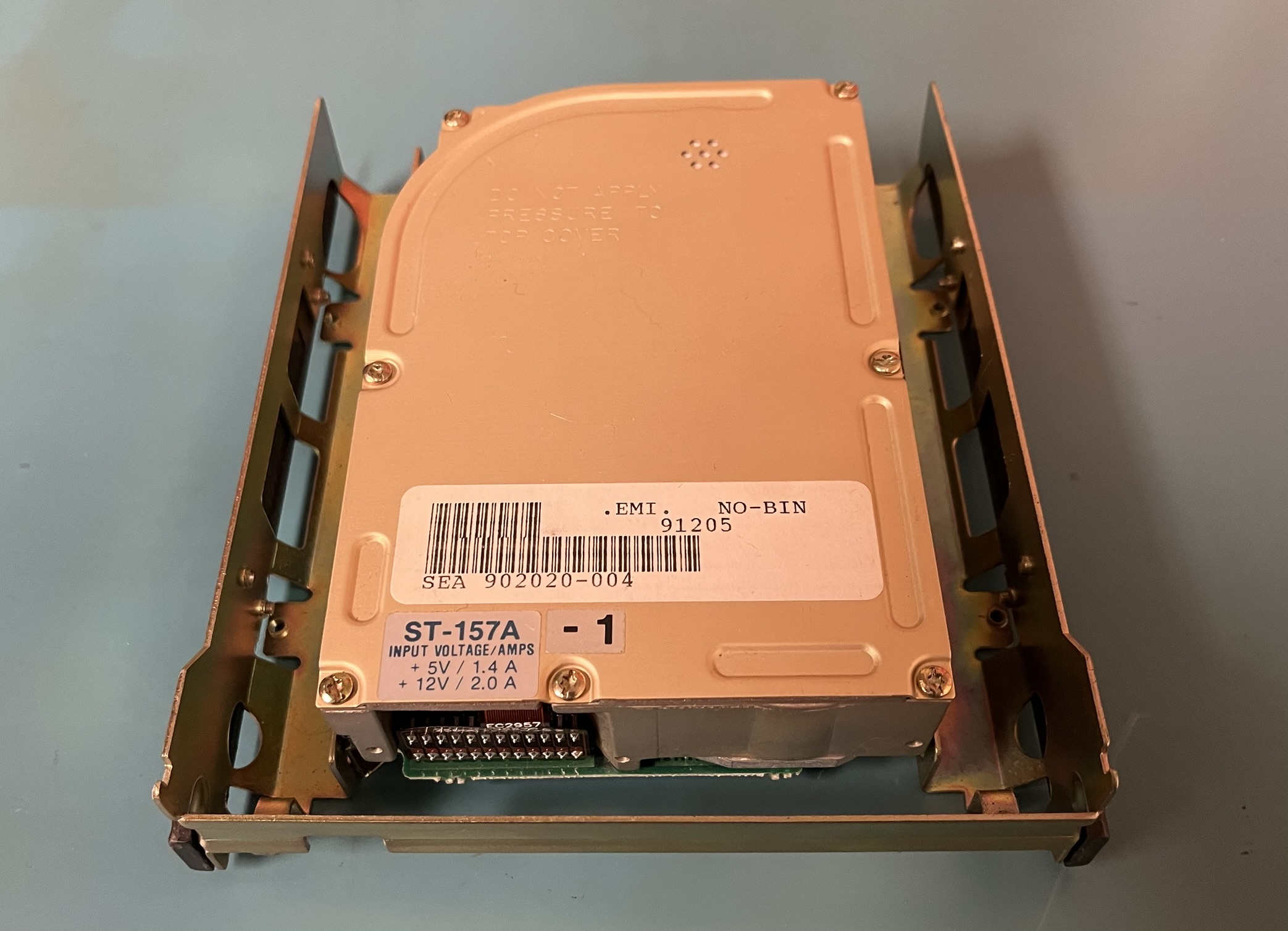
Along with those two pieces of hardware, I run the XT-IDE Universal BIOS v1.1.5, and tell the IBM BIOS that there are zero hard disks in the system, letting the XUB manage the controller. The XUB can be installed in an XT-IDE with the IDE section left unpopulated, plugged into the boot ROM socket on an Ethernet card, or installed in the two open sockets on the AT motherboard:

The EPROMs are 27256 type, and need to be 150 nS or faster. The image files I usually run can be found here:
I have the XUB configured for “full operating mode” – this means it doesn’t break ROM BASIC by using interrupt vector memory at 30:0H. It does steal 1 KB of conventional memory, reducing the maximum amount from 640 KB to 639 KB. That doesn’t affect anything I do, but perhaps there exists a situation where that missing 1 KB matters. If you want “lite” operating mode, which uses memory at 30:0H but doesn’t steal from conventional memory, those image files are here:
The above images were split into high and low ROMs using srec_cat:
$ srec_cat xub_v115_at.hex -intel -split 2 0 -o xub_v115_at_high.hex -intel -address-length=2
$ srec_cat xub_v115_at.hex -intel -split 2 1 -o xub_v115_at_low.hex -intel -address-length=2
Both images are configured for a single controller and system bootloader – they don’t present a boot menu, try A: drive first, and then C: drive if A: is not bootable. For the “full operating mode” images, if C: is not bootable, ROM BASIC will load.
I run the XUB from the open ROM sockets on the AT motherboard for two reasons: it lets me remove the Ethernet card and still boot the internal hard disk, and I wasn’t going to use them for anything else, anyway!
I’m currently running the Seagate ST-157A for a few reasons. First off, I wanted to keep a mechanical drive in the system, but I wanted it to be easier to back up than the ST-138R that had been living in the system for some time. Second, it ensures there’s enough load for the AT’s power supply on the +12V rail – IBM originally provided a dummy load resistor for ATs without hard disks to ensure this. Finally, the ST-157A is old enough to be roughly contemporary with the system, but new enough that the XUB is able to auto-identify it without issues.
Since I’m letting the XUB manage the IDE controller, it’s no problem to unplug the ST-157A and substitute an industrial Flash module, CompactFlash card in an adapter, etc.
CMI drives replaced